FlowFuse 2.33: From Setting Up Plant Floor Hardware to Visualizing Your Data
Set up your own hardware directly, reach your equipment through a FlowFuse-certified Modbus connection, see every dashboard in one place, and keep firmer control over who and what can reach your platform.

FlowFuse 2.33 covers the whole path from setting up hardware on your plant floor to visualizing the data it produces. Onboarding now starts on the hardware itself, a FlowFuse-certified Modbus node connects you to your equipment, and every dashboard gets a home of its own. Alongside that, firmer controls govern who and what can reach your platform.
Set Up Your Plant Floor Hardware Straight From the Terminal
Getting your own hardware into FlowFuse meant working backwards. You signed up, found the remote instance section, learned what the Device Agent was, created the instance in the platform, copied its connection details, and only then ran the installer with that code in hand.
Now you can start where the hardware already is. Run the installer from your terminal and it takes you through signing up and connecting, ending with your machine registered as a remote instance and ready to build on. When something does block the connection, the Device Agent tells you exactly what, instead of failing quietly.
More of the from-scratch onboarding experience lands in upcoming releases.
Modbus Certified Node
FlowFuse Hub customers can now install a FlowFuse-certified Modbus node straight from the palette manager in their editor. It covers Modbus TCP and Serial — including RTU and ASCII — in a single package.
Modbus is one of the most common protocols on the factory floor, but the community package most teams rely on depends on volunteer maintainers. We forked node-red-contrib-modbus and now maintain our own version, backed by FlowFuse testing, SLA-backed security patching, and a long-term maintenance commitment. A node sitting at the center of your production flows no longer carries supply-chain risk.
This feature is available exclusively to FlowFuse Hub customers, on both FlowFuse Cloud and Self Hosted, from v2.33.
Your Dashboards, All in One Place
Dashboards now have a home. A new Dashboards entry in your team navigation lists every dashboard across your hosted instances, and opens each one right inside FlowFuse instead of a separate browser tab. Each application also has its own Dashboards tab, showing just the dashboards from that application's instances. A drawer lets you switch between dashboards in a single click, without going back to a list.
Until now, dashboards were reachable only through an "Open Dashboard" button on individual instance pages: fine if you knew where to look, a dead end if you didn't. Dashboard-only users had it worst, landing on a bare list of instances with nowhere to go. Now dashboards are a first-class part of the product, with a home scoped to exactly what each user can access.
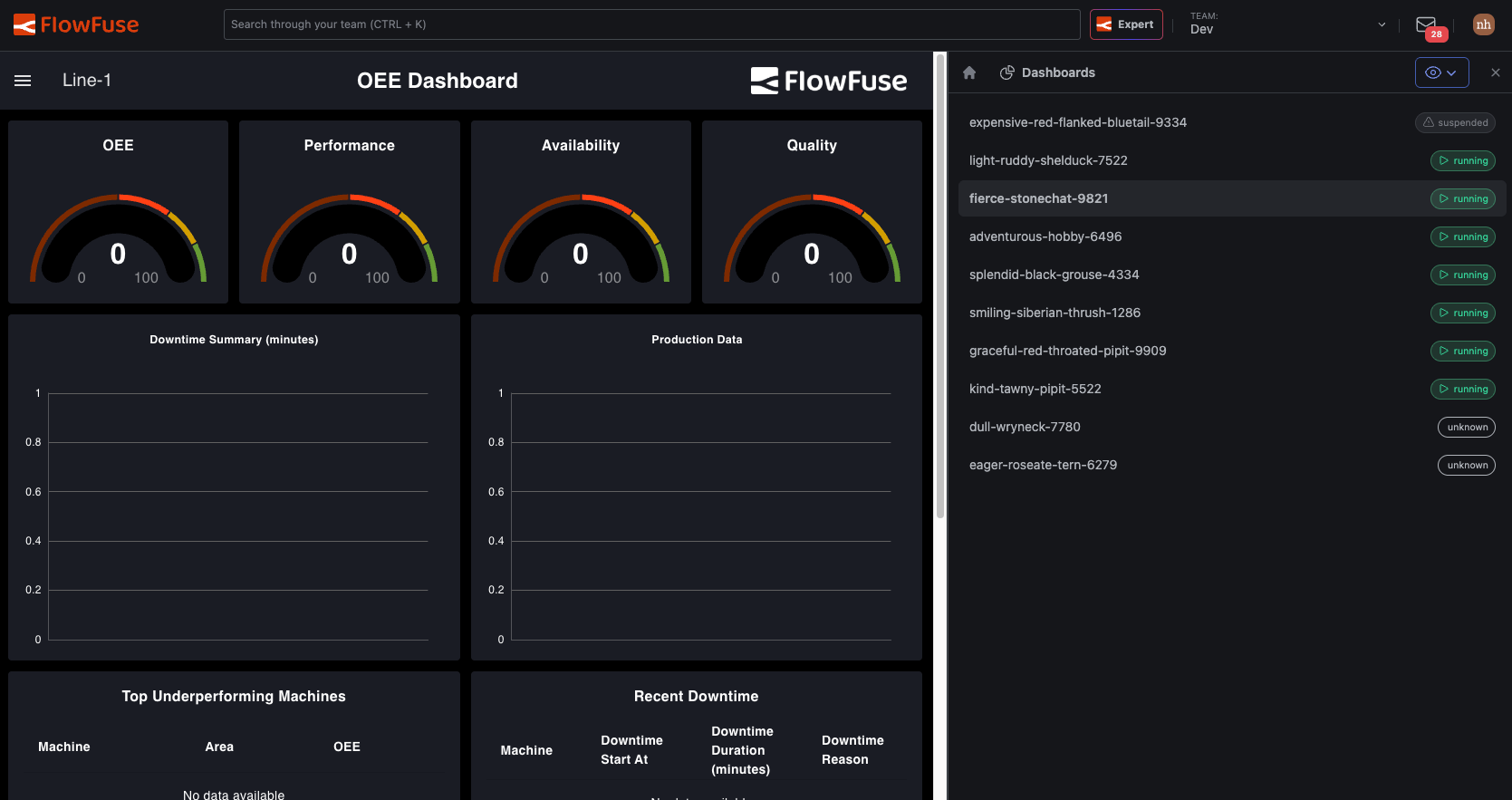
Availability: all users of FlowFuse Cloud and all Self Hosted users from v2.33.
Tighter Control Over Who and What Reaches Your Systems
The more of your platform that automated clients and AI agents can reach, the more the question shifts: not just what they are allowed to do, but what you can prove they did afterwards, and how narrowly you can scope their access up front. 2.33 adds three controls that answer it.
Every MCP Action, on the Record
FlowFuse now keeps an audit trail of MCP activity. When an AI client reads data or invokes a tool through FlowFuse, the action is logged: what happened, when, and under whose authority.
If you answer to an OT security team or an auditor, "the AI did it" is not an acceptable line in an incident report. The audit trail turns AI activity into the same kind of accountable, reviewable record you already expect from human operators.
Availability: [CONFIRM tier] from v2.33.
Scoped Personal Access Tokens
Personal Access Tokens now carry scopes. Create a token that can do exactly what its integration needs and nothing more.
Previously a PAT carried the full permissions of the user who created it. If you generated a token for a read-only dashboard integration, that token could still modify your instances. Scoped tokens close that gap and follow the least-privilege pattern your security team already applies everywhere else.
Getting started: [CONFIRM: Team Settings path and scope options]
Availability: [CONFIRM tier] from v2.33.
Manage Granular RBAC Through Your Identity Provider
SSO admins can now map SAML groups to FlowFuse's granular roles. When someone joins the "Plant Floor Operators" group in your identity provider, they get the matching FlowFuse permissions automatically. No manual role assignment, no drift between your IdP and your platform.
Availability: Enterprise [CONFIRM] from v2.33.
Also in This Release
- The Expert is better at telling when you want it to act versus when you want guidance. [CONFIRM #411 landed]
- MCP server enumeration is much faster for teams with many instances.
- Fixed dropdown inputs rejecting values that matched the start of a suggestion.
- Plus dependency updates and smaller fixes.
For detailed breakdowns of each feature with additional visuals, visit our changelog. For the complete list of everything included in FlowFuse 2.33, check out the release notes.
If something in this release improves your workflow, or if there is still friction we can remove, please share feedback or report issues regarding this release to us.
Try FlowFuse
FlowFuse Cloud
The fastest way to get started is with FlowFuse Cloud. Get started for free and have your Node-RED instances running in minutes.
Self-Hosted
Run FlowFuse locally using Docker or Kubernetes.
What's Next
2.33 closes out the 2.x line. Something bigger arrives in August. 📈
Discuss your use case with our team
See how FlowFuse can support your architecture, integrations, and deployment needs.
Table of Contents
Like what you’re reading?
Add FlowFuse as a preferred sourceOn the page that opens, check the box next to flowfuse.com to see more of our articles in your Google Search results.
Related Articles:
- FlowFuse 2.32: Certified Redis, Git Pipelines for Any Server, Insights on Remote Instances, and Dark Mode
- FlowFuse 2.31: Agentic Development Now in Open Beta, FlowFuse Expert Builds Your Industrial App on Edge Devices
- FlowFuse 2.30: Expert Builds Your Industrial Application
- FlowFuse 2.29: FlowFuse Expert Comes to Self-Hosted Enterprise
- FlowFuse 2.28: Troubleshoot Faster, Manage Edge Devices Centrally, and More Self-Hosted Flexibility